


Quick Links

Frequently Asked Questions and Guides
This page is intended to help transition our members to our new website. Please contact membership@kcba.org with any questions you may have regarding the website.
Login/Profile Information
If this is your first time logging in, you need to click "I forgot my username and password" below then enter your email address to be sent a link to set up your login.
- Q: How do I reset my username/password?
- Head over to the login page., or click "Sign In" at the top of the webpage to be prompted to login.
- Click on "I forgot my username and password".
- Enter your email address to receive an email with instructions for resetting your username/password. If you did not receive the email, please check your spam folder or email us at membership@kcba.org
- Q: How do I update my profile?
- After logging in, head over to MyKCBA.
- To update your photo or profile, simple click on the desired link below the welcome banner to edit/change your information.
E-Community & Listserv Guide (Committees and Sections)
There are now more options available to you as modes of communication with your fellow section members. The new website comes with the functionality of "E-Communities". Each Section/Committee is assigned an E-Community page that contains:
- Section/Committee Directory: The directory tab displays all members of this section/committee with leadership listed first.
- Section/Committee Lists: The lists tab is where you can post messages to the group or follow discussions.
- Section/Committee Files: The files tab is where you can view documents relevant to the section/committee.
- Section/Committee Calendar: The calendar tab will display all section/committee events.
- Section/Committee Announcements: The announcements tab is where you can view section/committee meeting reminders and other section/committee event announcements.
This is a guide on how to navigate your NEW discussion listserv. Please follow the 5 steps below to ensure that you can maintain communication with your peers in the section. If you have any questions, please contact membership@kcba.org.
1. To access the E-Communities, head over to Committees or Sections and click on your intended community and click on the Members Area Button:
.png)
.png)
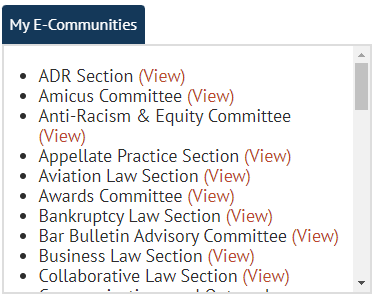
OR, you can navigate to your MyKCBA page and access through the following tab which will display the sections and committees that you are currently a member of:
2. Once you are at your E-Community, you will see the aforementioned options:

3. Click on “Lists”.
.png)
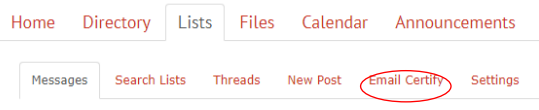
4. Select “Email Certify” and type in the email address that you wish to join the email listserv or discussion forum for your section.
5. Once you have completed the email certification, your email address will appear: Now, that you are certified to email the discussion group, you will send your emails from the certified address and to:
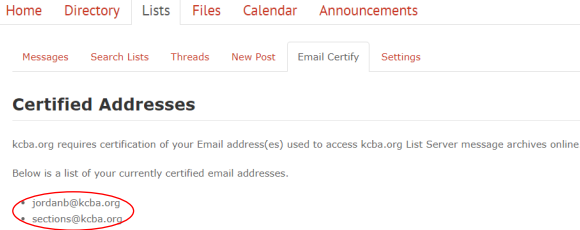
Now, that you are certified to email the discussion group, you will send your emails to the Listserver Address that you can find on the E-Community's Home Page.

